PlowzBox · Use cases
Six moments every landscaper knows.
The 7pm quote request. The rained-out Tuesday. The invoice pile at 9. Here is how each one plays out when there's a PlowzBox on the shelf at your shop, answering as your company and waiting for your tap.
Plain talk: prices come from your own price book and times from your real calendar. The assistant never invents either.
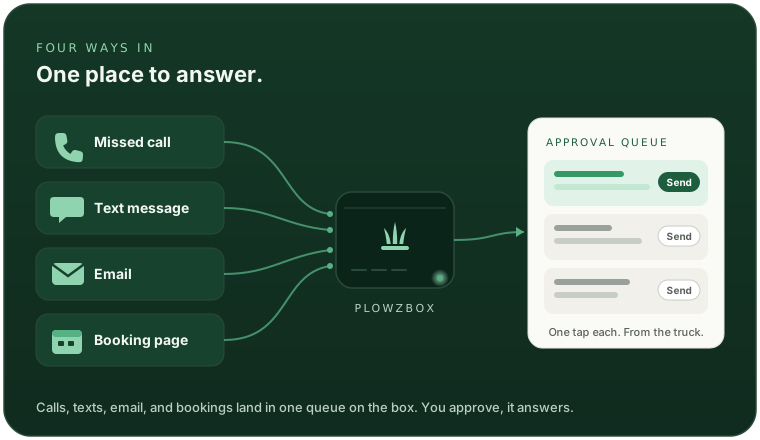

Scenario 01 · Thursday, 7:04 PM
The 7pm quote request.
You're on the mower, finishing the last lawn of the day. Your phone buzzes: a homeowner three streets over wants a price on weekly mowing. By the time you park the trailer, they'll have texted two other companies.
What the box does
- Answers in seconds, with your real price for that service, pulled from your price book. It never guesses a number.
- Offers a real opening from your actual calendar, not an invented slot.
- Waits for you. The draft sits in your queue until you tap approve, from the mower seat if you like.
7:04 PM · new text while you're on the mower
Hi, how much for weekly mowing at 42 Maple Ave? Decent size yard, fenced back.
Drafted in seconds, from your price book + calendar
Draft · waiting for youHi! Weekly mowing at 42 Maple Ave is $60 per visit, trim and blow included. We have Thursday morning open this week. Want me to get you on the schedule?
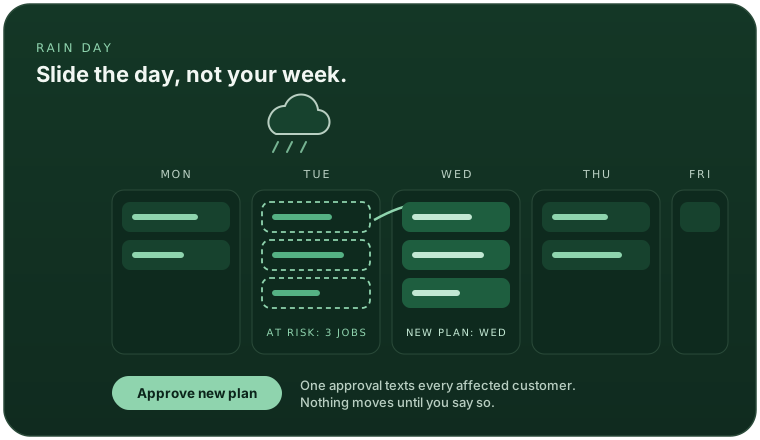
Scenario 02 · Monday, 8:40 PM
The rained-out Tuesday.
The forecast turns overnight and tomorrow is a washout. Normally that's an evening of texting every Tuesday customer one by one, then untangling the rest of the week.
What the box does
- Flags the jobs at risk when the forecast turns, before you've even looked at the radar.
- Drafts a reshuffled plan that slides the day, plus the customer texts to go with it.
- One approval sends them all. Every affected customer hears from you at once, and nothing moves until you say so.
More on routes and rain plans on the scheduling page.
Scenario 03 · A slow Wednesday
The customer who went quiet.
Spring cleanup went great, and then... nothing. She didn't fire you. She just never got around to booking again, and you never got around to asking. That's how good customers quietly become someone else's.
What the box does
- Notices the gap. No visit on the calendar in a while, at a threshold you choose, say 60 days.
- Drafts a warm re-book text in your company's voice, using their actual job history. No spam blast, one customer at a time.
- Sends nothing on its own. Every re-book text waits for your approval, and you can edit or skip it.
Quiet customer: no visit in ~60 days (your threshold)
Draft · waiting for youHi Maria, it's Cedar Lawn Care. It's been a couple of months since your spring cleanup and the beds are probably due. Want us to swing by this week? Same crew as last time.
Scenario 04 · Friday, 4:15 PM
The unhappy caller.
A customer says the crew skipped her backyard and she wants money back. This is exactly the moment an AI should not be clever. So it isn't.
What the box does
- Does not auto-reply. Upset customers, refunds, disputes, and legal talk are never answered automatically. That's a hard rule in the software, not a setting.
- Flags you immediately, with the full message and the customer's history, so you walk into the call knowing the account.
- Stays out of the money. The box never promises a refund, a discount, or a fix. That conversation is yours.
Flagged · needs you
This is ridiculous. Your crew skipped my whole backyard again and I'm not paying for this. I want a refund.
- No auto-reply sent. Ever, for messages like this.
- Flagged straight to your phone
- Full thread and job history attached
Scenario 05 · Saturday, 10:20 AM
The Spanish-speaking customer.
A neighbor of one of your Saturday accounts texts in Spanish, asking for a mowing price. If the answer comes back in confident English boilerplate, you've probably lost her.
What the box does
- Answers in Spanish, because that's the language she wrote in. English gets English. No settings to flip.
- Same grounding rules: the price is from your price book, the slot from your calendar, in either language.
- Escalates in either language. If the conversation turns sensitive, it's flagged to you the same way, whatever language it started in.
Hola, ¿cuánto cuesta el corte de césped en 15 Willow Court? Es un patio mediano.
Drafted in Spanish, from your price book + calendar
Draft · waiting for you¡Hola! El corte semanal en 15 Willow Court cuesta $45 por visita, con bordes y soplado incluidos. Tenemos espacio el martes por la mañana. ¿Le agendamos?
Scenario 06 · Tonight, 9:00 PM
The 9pm invoice pile.
Three jobs wrapped today. The old routine: kitchen table, laptop, retype the same customer info three times, give up, do it Sunday. Meanwhile nobody's been billed.
What the box does
- Drafts the invoice from the job record the moment a job is marked done. Customer, service, price from the book, no retyping.
- Drafts the payment-link text to go with it, using your own pay link.
- You approve in minutes, one tap per invoice, from the couch. The box never marks anything paid on its own; you keep the books honest.
How quotes, invoices, and reminders fit together, on the billing page.
Tonight's drafts
3 invoices · 9:02 PMThe pattern
Every story ends the same two ways.
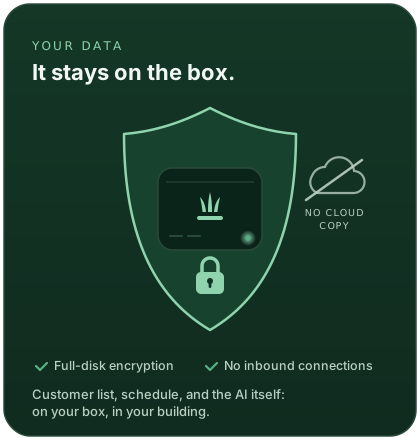
Different moments, same shape: the box does the typing, you make the call, and the whole thing happens on hardware in your building.
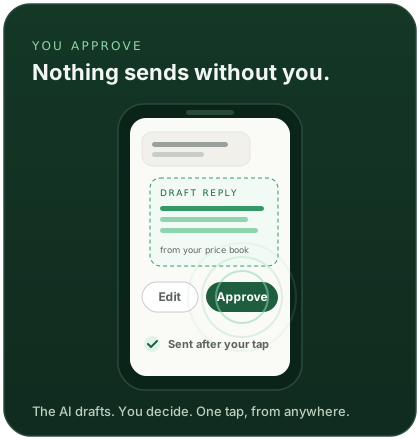
And the third rule under it all: it never makes things up. No invented prices, no fake bookings, and the hard conversations come straight to you. More on the local AI page.
Early access
Which one was your week?
Bring your real Tuesday to the demo. We'll show you how the box would have handled it, on the hardware in front of you.
You own the box. Your data stays on it. Pricing announced at demo.
Keep exploring
The features behind the stories.
Never miss a call
Missed-call text-back and voicemail transcribed on the box, with a drafted reply waiting for you.
Read moreAnswer every text
The AI receptionist for texts and email. Grounded answers, your one-tap approval, English and Spanish.
Read moreBooking and the day
Online booking, recurring jobs, crew run-sheets by text, route ordering, and weather reflow.
Read moreGet paid
Good-better-best quotes with tap-to-accept, invoices with AR aging, and payment reminders on your rules.
Read moreLocal AI
Open-weight models running on the box itself. No cloud account, no per-token fees, works offline.
Read moreEverything above is a story about features the product actually has today: grounded replies, approval queue, weather reflow, re-book drafts, sensitive-message flagging, Spanish, and invoice drafting. No outcome numbers are claimed on this page; the conversations are examples, not transcripts.