PlowzBox · How it works
What happens between a text and a booked job.
No magic, no hand-waving. This page walks the whole path: the box on your shelf, what it learns about your business, how it drafts a reply, where you tap approve, and what it does after the customer says yes.
The short version: plug it in, teach it your business, and hold the approve button. Everything else is detail, and the detail is below.

Step one · The box
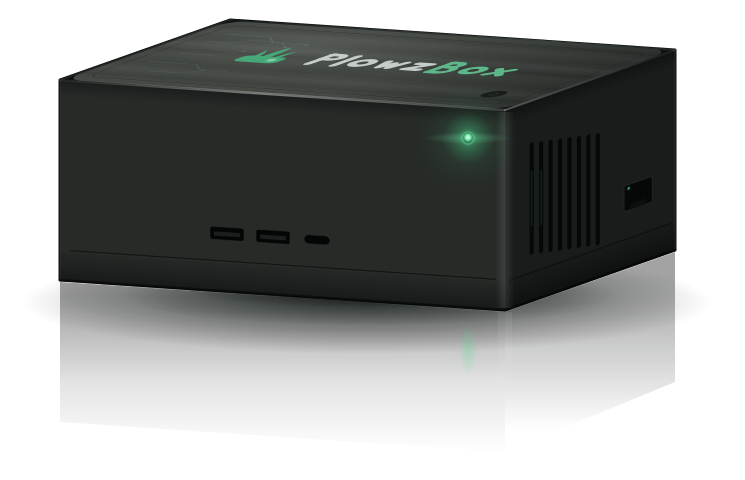
It's a small computer. It plugs into your router.
PlowzBox is an appliance, like a modem or a thermostat, not an app you install or a website you log into. Inside is a small Intel PC running Linux. Everything this site describes runs on it, in your building.
-
Unbox it
In the box: the PlowzBox itself, a power cable, and an ethernet cable. That is the complete parts list.
-
Plug it in
Power to the wall, ethernet to a free port on the router at your shop or home office. No server room, no IT guy, no software to install on your computer.
-
It comes online
The status light goes green and the owner dashboard is ready on your phone or laptop, protected by a PIN only you set. Then the real setup starts: teaching it your business.
The whole install. If you can plug in a router, you can plug in a PlowzBox.
For the technically curious: Intel NUC small-form PC · Ubuntu Linux · full-disk encryption (LUKS2) · no inbound connections from the internet. More on that side of things on the security page.
Step two · It learns your business
Before it says a word, it learns what's true.
The assistant doesn't answer from imagination. It answers from records you give it and records it keeps. That is the difference between an AI that helps and an AI that embarrasses you.
What you actually offer
Weekly mowing, cleanups, mulch, hedge trimming, whatever your operation really sells. If you don't offer it, the assistant says so instead of promising it.
Where every dollar comes from
Every price the assistant ever quotes comes from your price book, including lot-size pricing: set your bands by acreage and “about an acre” gets that band's price, or measure the lawn on a satellite map. If the price isn't in there, it tells the customer it needs to check and flags you. It never guesses a number.
Real openings only
It knows when you work and what's already booked, so it offers slots that actually exist. No phantom appointments, no double-booked Saturdays.
Who's who
Customers, properties, past jobs, and notes build up on the box over time, so “it's Dave on Maple Ave” means something to it.
How this works under the hood: a technique called retrieval-augmented generation. An embedding model indexes your price book, your job history, and a professional landscaping knowledge base, so when a question comes in, the AI is handed the right page of your records to answer from, instead of answering from thin air.
Step three · A customer reaches out
One message, five stops, your thumb on the last one.
A text, an email, or a missed call that turns into a text-back. Whatever the channel, every message rides the same rails:
-
A message arrives
A customer texts, emails, or calls while you're on the mower. A missed call becomes an automatic text-back so they aren't dialing your competitor.
-
It understands
The AI works out who's writing, which property it's about, and what they're actually asking, even when the ask is three questions in one rambling text.
-
It checks what's real
Your calendar for genuine openings. Your price book for the real number. Your records for the history. Nothing in the reply is invented.
-
It drafts a reply
A grounded draft in your company's voice. If the answer isn't in your records, the draft says so honestly and the question is flagged to you.
-
It waits for you
The draft sits in your approval queue. You decide which kinds of replies can go out on their own and which always wait for your tap.
Step four · You approve from your phone
The approve button is the point.
Drafts queue on your phone. Read it, tweak it if you want, tap approve, and it sends from your business number. Ten seconds at a red light instead of twenty minutes at the kitchen table.
- One tap to approve, easy edit before it sends.
- You choose what's allowed to send automatically and what always waits.
- Disputes, refunds, and upset customers are never answered automatically. They come straight to you, always.
Hey, do you guys do fall cleanups? Corner lot on Maple Ave, leaves are out of control
PlowzBox checks your price book + this week's openings
Prices come from your price book, not from this website.
Step five · After the yes
The yes is where the busywork starts. It handles that too.
Most tools stop at the reply. The point of an office manager is the follow-through: the booking, the nudge, the invoice, the crew sheet.
On the real calendar
The job lands in a genuine opening within your crew's real capacity, the customer gets a confirmation, and reminders and “on our way” texts follow without you touching it.
Scheduling : booking and crew detailsFollow-ups that don't forget
Sent quotes get polite follow-up nudges drafted for you, because the fastest and most persistent responders win the work.
Quotes & billing : quote follow-up detailsThe awkward ask, drafted
Invoices go out when the work is done, payment reminders run on the rules you set, and the books follow: a free CSV import or a sync moves it all into your own QuickBooks.
Invoicing : invoicing and reminders detailsTomorrow, on one sheet
Each crew gets a day board: where to be, what to do, gate codes and notes included, so the morning doesn't start with twelve texts.
Crew run-sheets : crew day board detailsThe brains · All on the box
Two sizes of brain, and the box picks.
All the AI in this walkthrough runs on the box itself. No cloud account, no per-token fees. There are two main models, and the box routes each message to the right one on its own.
Routine questions, answered in a blink
“When's my next mowing?” or “can you come Thursday instead?” goes to a small, quick model that answers in about the time it takes to read. Most messages live here.
Nuanced ones get the bigger model
A tangled quote request, a long winding email, a customer who's asking three things at once: those get handed to a larger model on the same box. Slower by a beat, better judgment. You never pick, the box routes it.
For the technically curious: qwen2.5:7b handles the fast tier, phi4:14b takes the hard and nuanced questions, qwen2.5-vl reads customer photos, and nomic embeddings power the search over your records, all served by Ollama on the box's own hardware. No API keys, no external model endpoints, no cloud fallback quietly sending your data out. Full story on the local AI page.
Honest fine print
What needs the internet, and what doesn't.
The AI and your records live on the box, so a dead connection doesn't stop your day. But messages still have to travel, and travel takes a connection. Here's the honest split.
Everything that lives on the box
- Your schedule and calendar
- Customer records, job history, and notes
- The AI assistant, drafting and answering your questions
- Crew day boards and the owner dashboard, on your local network
Anything that has to travel
- Sending and receiving texts and emails
- Missed-call text-backs
- Checking the queue from your phone while you're away from the shop
Same as any phone. When the connection drops, the box keeps planning and drafting; outbound messages go when the connection comes back. Nobody's product texts without a network, and we won't pretend ours does.
Early access
Watch the whole loop run, live.
At the demo, a real message goes in one end and an approved, grounded reply comes out the other, off the box, in front of you.
You own the box. Your data stays on it. Pricing announced at demo.
Keep exploring
Go deeper on any piece of it.
Security & privacy
Encrypted disk, local AI, no inbound connections, owner PIN, and what we deliberately do not do.
Read moreNever miss a call
Missed-call text-back and voicemail transcribed on the box, with a drafted reply waiting for you.
Read moreAnswer every text
The AI receptionist for texts and email. Grounded answers, your one-tap approval, English and Spanish.
Read moreThe local AI
Why the models live on your box, what that costs (nothing per token), and how it works offline.
Read more